Archive
How to install and/or update Windows Admin Center extensions in offline/disconnected environment?
I often work with disconnected systems where WAC is successfully deployed and rarely or never updated. One update that is not easy to do with offline WAC installation is pushing update for all the installed extensions.
If our WAC gateway server doesn’t have internet connectivity, we can go to WAC feed for extensions (v1) on any internet connected device and manually download extensions we want to install and/or update in our WAC deployment. To complicate this process further, we can browse through few more feeds to find all relevant extension packages: public (v1), WAC-public (v2),…
Instead of manually finding the right/latest version of extensions for our WAC version (v1 and/or v2), we can use PowerShell to speed things up… In my WAC repository we can find two scripts that will do most of the work for us:
Both scripts connect to the relevant WAC extension feed, ask for the download location (folder) and automatically download all latest versions of compatible extensions.
After we have this extension repository in locally, we need to transfer it somewhere in our disconnected environment. Usually I store it locally on WAC server (no extra delegation/sharing needed), but it can as well be somewhere on our network. If we plan to use network share on remote server, we need to remember that WAC service by default runs as “Network Service” and we must allow read access for WAC gateway computer object:

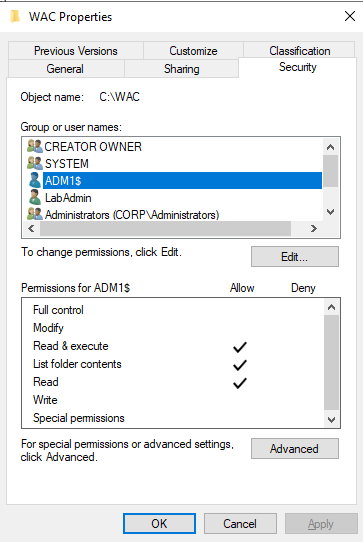
After we have folder with extension packages in place locally or on remote server, we need to update WAC extensions feeds:
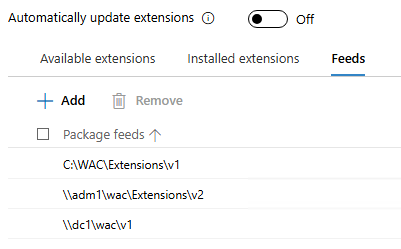
In the above picture ADM1 is WAC gateway and DC1 is used as remote share.
One thing to remember – currently WAC supports a maximum of three extension feeds.
If we enable auto-update, extensions will automatically update from our local source as well. If not, well than it’s up to us…
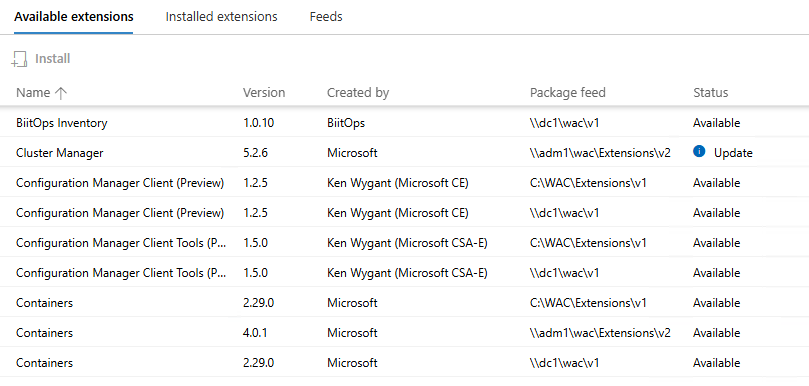
If we want to enable support for both V1 and V2 extensions in WACv2, we can check one of my previous posts on this exact topic (hint: it’s because of Configuration Manager extension).
Until next time…
 Going down the IT rabbit hole