Archive
Enable support for Configuration Manager extensions in Windows Admin Center v2
Windows Admin Center (WAC) v1 (2311, MSI,…) has it’s own extension feed (https://aka.ms/sme-extension-feed):

With this older version of WAC we are able to extend WAC functionality with support for Configuration Manager Client and Configuration Manager Client Tools. New WAC (WAC v2) is using different extension feed and as of mid-February 2026 this feed doesn’t have Configuration Manager extension.
WAC v1 – default extensions:
Apps & features
Azure Backup
Azure File Sync
Azure hybrid center
Azure Kubernetes Service
Certificates
Cluster Creation
Cluster Manager
Developer Guide
Devices
Diagnostics
Events
Failover cluster tools
Files & file sharing
Firewall
GPUs
Hardware Manager for Azure Stack HCI (Microsoft Hardware Only)
Local users & groups
Microsoft Defender for Cloud
Network ATC
Network Controller tools and SDN Virtual networks
Networks
Packet monitoring
Performance Monitor
PowerShell
Processes
Registry
Remote Desktop
Remote Support
Roles & features
Scheduled tasks
SDN Gateway connections
SDN infrastructure
SDN Load balancers
SDN Logical networks
SDN Network security groups
SDN Route tables
Security
Server Manager and Computer Management
Services
Storage
Storage Migration Service
Storage Replica
System Insights
Updates
WAC v1 – available extensions:
Active Directory
Advantech IPMI Management (Preview)
Azure Cloud Shell (Preview)
Azure Extended Network
BiitOps Changes
BiitOps Inventory
Configuration Manager Client (Preview)
Configuration Manager Client Tools (Preview)
Containers
DataON MUST Pro
DataON MUST Visibility, Monitoring, and Management Tool
Dell APEX Cloud Platform
Dell OpenManage Integration
Dell PowerPath
Dell PowerStore Manager
DHCP (Preview)
DNS
Fujitsu ServerView® Health
Fujitsu ServerView® RAID
FUJITSU Software Infrastructure Manager
HPE Azure Stack HCI Cluster Deployment and Update Snap-In
HPE OneView WAC Extension
HPE Server and Azure Stack HCI WAC Extensions
HPE Storage
Intel® Server Debug and Provisioning Tool
Lenovo XClarity Integrator
Marvell QLogic Fibre Channel QConvergeConsole Extension
msft.iis.iis-management
NEC ESMPRO
Pure Storage FlashArray
QCT Management Suite
SDN Public IP addresses (Preview)
secureguard blazics Updates
Security (Preview)
Thomas-Krenn.AG | Driver & Firmware Updates
Thomas-Krenn.AG | S2D Micro-Cluster
WAC v2 – default extensions:
Apps & features
Azure Backup
Azure File Sync
Azure hybrid center
Certificates
Cluster Creation
Cluster Manager
Developer Guide
Devices
Events
Failover cluster tools
Files & file sharing
Firewall
Local users & groups
Network ATC
Network Controller tools and SDN Virtual networks
Networks
Packet monitoring
Performance Monitor
PowerShell
Processes
Registry
Remote Desktop
Roles & features
Scheduled tasks
SDN Gateway connections
SDN infrastructure
SDN Load balancers
SDN Logical networks
SDN Network security groups
SDN Route tables
Security
Server Manager and Computer Management
Services
Storage
Storage Migration Service
Storage Replica
System Insights
Updates
Virtual machines and switches
Windows LAPS
WAC v2 – available extensions:
Active Directory
Azure Kubernetes Service
Containers
DataON MUST Visibility, Monitoring, and Management Tool
Dell APEX Cloud Platform
Dell OpenManage Integration
DHCP
DNS
GPUs
Lenovo XClarity Integrator
NEC ESMPRO
NetApp Shift Toolkit (Preview)
Pure Storage FlashArray
VM Conversion (Preview)
What happens if we add WAC v1 extension feed to WAC v2?
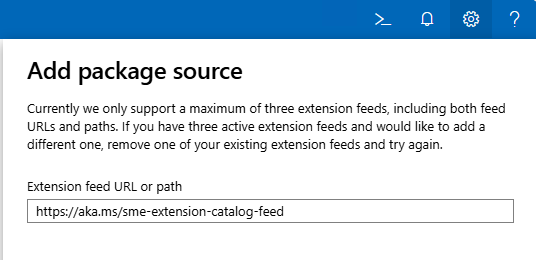
Hm, it gets successfully added…
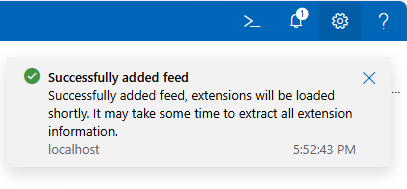

But, does it actually work? Well, no…

To get support for old extension feed in WAC v2, we are still missing one key configuration change:
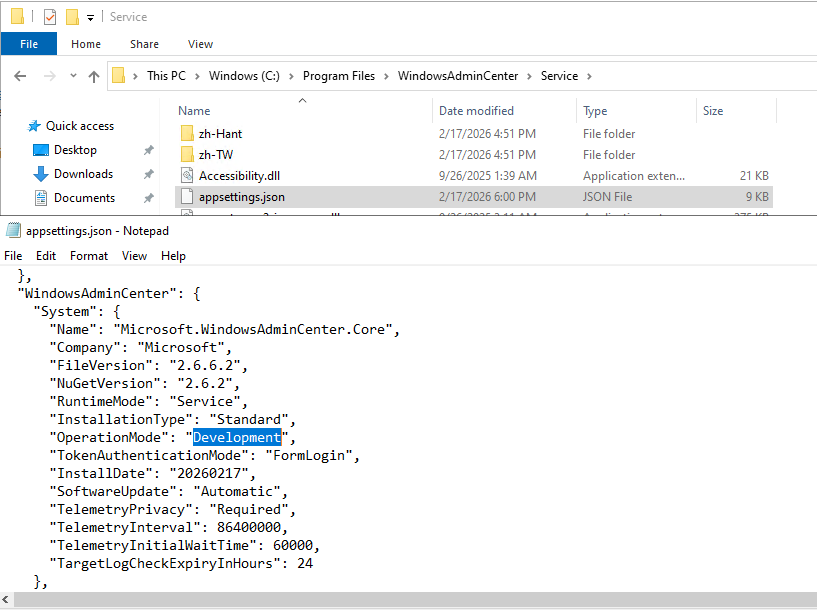
We need to change WAC “operation mode” from “Production” to “Development”. And because this is WAC service configuration file we just changed, we must restart WAC service (Restart-Service -Name WindowsAdminCenter) before we can see this change applied to our WAC portal:
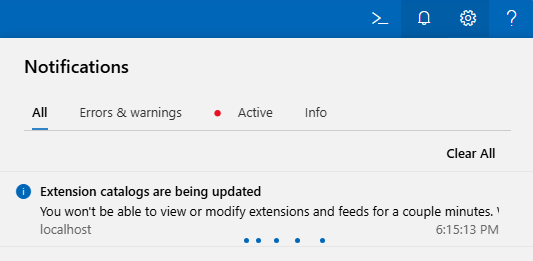
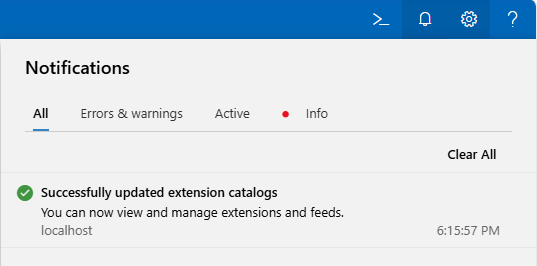
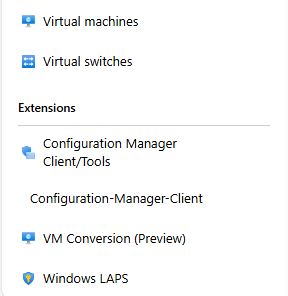
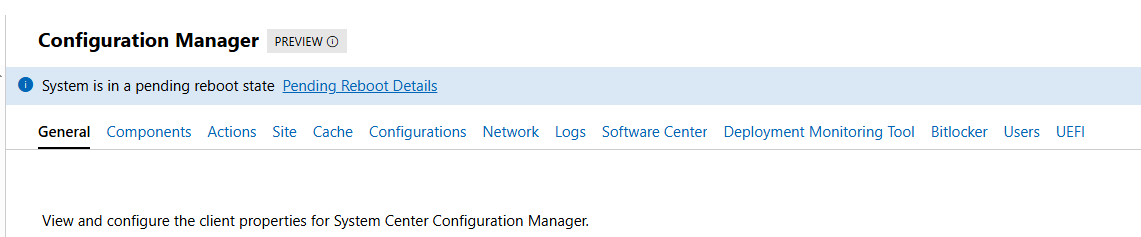
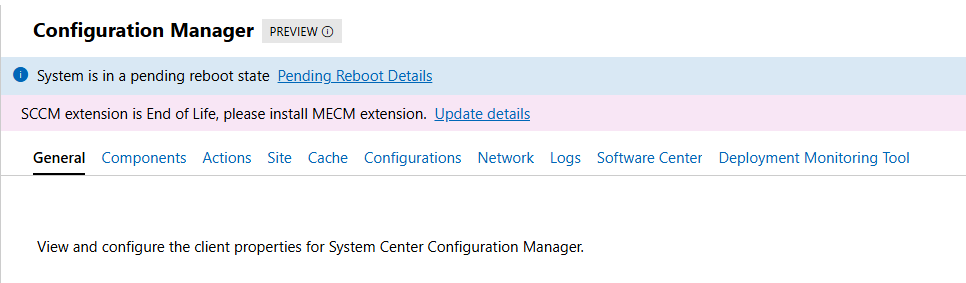
If all goes well, we can now see all “old WAC v1” extensions, including the two for the Configuration Manager Clients:
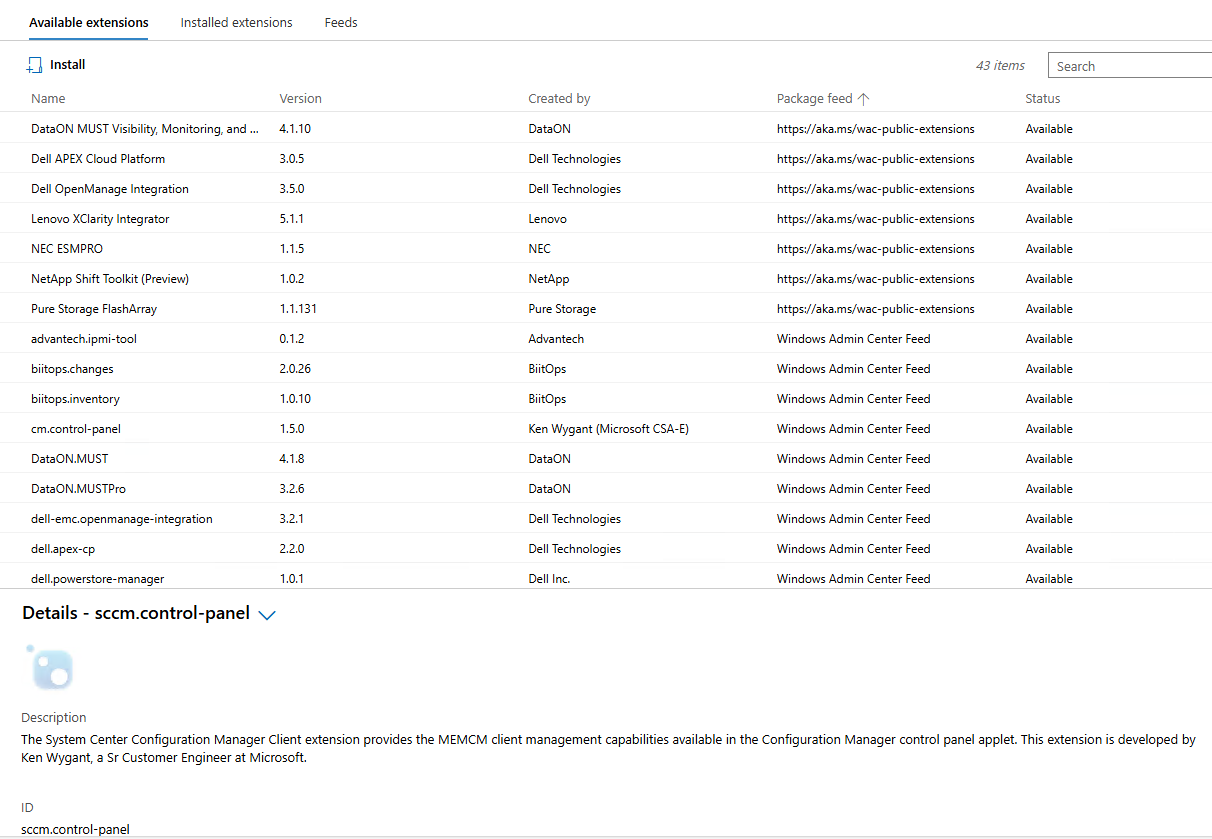
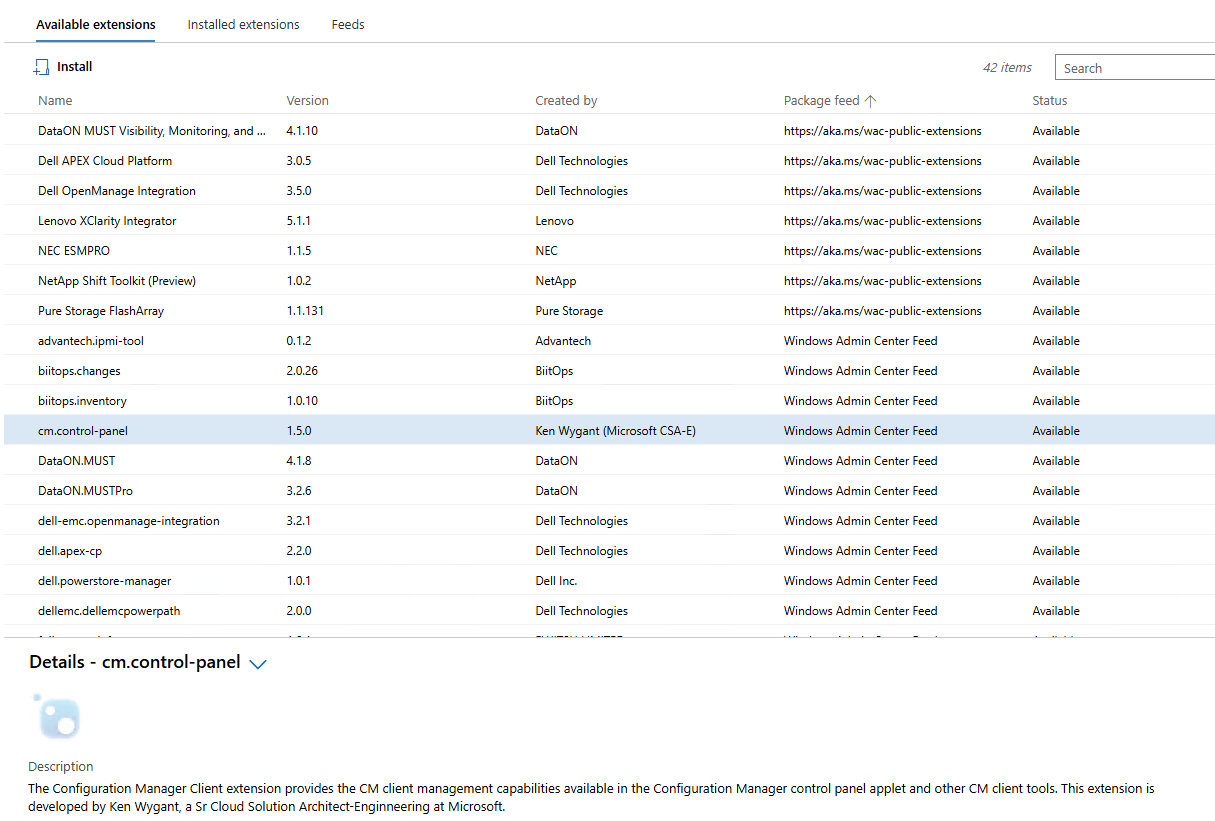
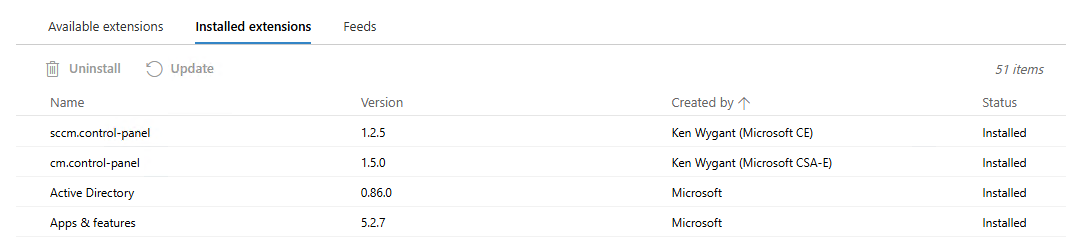
CM extensions installed side-by-side with new extensions on WAC v2:
Until we meet again…
Windows Server management with Azure Arc now for free for SA customers
Microsoft has recently announced a significant enhancement to Azure Arc licensing. Beginning in November, all customers using Microsoft Azure with Windows Server licenses, whether they are under active Software Assurance or active subscription licenses, will have the opportunity to enable Azure Arc capabilities at no additional cost. This positive change aims to facilitate greater access to Azure Arc features, allowing organizations to manage and govern their on-premises servers alongside Azure resources more effectively.
Revolutionizing Windows Server Management with Azure Arc
In today’s digital landscape, managing hybrid environments effectively is crucial for businesses. With the advent of Azure Arc, organizations can extend Azure management capabilities directly to their Windows Server instances, enhancing operational efficiency and governance. This innovative approach benefits customers who hold Windows Server licenses with active Software Assurance or subscription licensing, offering powerful tools designed to streamline server management and boost productivity.
Azure Arc-enabled servers support a suite of rich features, including Azure Update Manager, Azure Change Tracking and Inventory, and Azure Machine Configuration. Collectively, these tools empower businesses to assess update statuses, monitor system changes, and configure machine properties seamlessly. Significantly, these capabilities facilitate better visibility into compliance and inventory, ensuring organizations remain resilient and up-to-date in a rapidly evolving IT environment.
Key Features That Elevate Server Management
With the integration of Azure Arc, users can benefit from advanced services tailored for Windows Server 2025. Among these are the Windows Admin Center in Azure, Remote Support, and Network HUD. These enhancements allow administrators to manage hybrid machines securely and efficiently from anywhere, eliminating the need for cumbersome VPNs or direct inbound connections. This flexibility translates into reduced downtime and improved responsiveness towards issues, ultimately contributing to overall business continuity.
Furthermore, tools such as the Best Practices Assessment and Azure Site Recovery Configuration offer valuable analytics and insights, guiding users in optimizing performance and guaranteeing data resilience. Through these robust features, Azure Arc not only simplifies management tasks but also instills confidence that critical workloads remain protected and operational, even in times of disruption.
Maximizing Benefits and Ensuring Eligibility
It is essential for organizations wishing to leverage these tools to attestation their Azure Arc-enabled servers or enroll in Windows Server pay-as-you-go plans, ensuring access without incurring additional costs. Benefits such as Azure Update Manager and Change Tracking are part of this package, although users must remain aware of potential data ingestion costs associated with Log Analytics workspaces.
Moreover, businesses must adhere to specific requirements, including maintaining updated Connected Machine Agent versions and ensuring proper licensing. By navigating these stipulations effectively, organizations can fully unlock the potential of Azure Arc, paving the way for a transformative server management experience that aligns with modern operational needs.
Upon attestation, customers receive access to the following at no additional cost beyond networking, storage, and log ingestion:
- Azure Update Manager (Windows Server 2012 and above)
- Azure Change Tracking and Inventory (Windows Server 2012 and above)
- Azure Machine Configuration (Windows Server 2012 and above)
- Windows Admin Center in Azure for Arc (Windows Server 2025 only)
- Remote Support (Windows Server 2025 only)
- Network HUD (Windows Server 2025 only)
- Best Practices Assessment (Windows Server 2025 only)
- Azure Site Recovery Configuration (Windows Server 2025 only)
More information about Azure Arc and new Windows Server Management features is available at: Windows Server Management enabled by Azure Arc (video review by John Savill: FREE Azure Services for NON-Azure Windows Servers Covered by SA Powered by Azure Arc!).
 Going down the IT rabbit hole